My whole career in IT, sizing has felt like a dark art. Early on, it was all manual data collection. RVTools exports, Excel spreadsheets, everyone’s “magic” formula that kind of worked but nobody could explain. Over time, those tools got smarter, the spreadsheets standardized, and things got easier.
Sizing Backup Repositories for VBR has been no different, especially now that I’m doing VDC Vault designs almost daily. The pattern is always the same. We jump on a Teams call, someone shares their VBR Console, and we start hunting for inputs to plug into the official Veeam Calculator. For small environments, that works fine. For everything else, it’s a slog.
It’s not just sizing anymore. Vault requires specific best practices that aren’t always in place. Backups need to be encrypted. Some workloads aren’t compatible yet. There are minimum retentions to hit. At scale, the manual audit gets overwhelming. You start making assumptions because you don’t have time to click through 200 jobs. Human error creeps in.
The data already exists. The Veeam HealthCheck (vHC) collects everything we need: job configs, retention settings, encryption status, all exported as JSON. But there’s no quick way to audit that data for Vault readiness, so I built one.
Fair warning: this is an unofficial, work-in-progress tool. It’ll catch obvious blockers, but don’t bet your migration timeline on it. The validation logic is still being refined, bugs exist, and it’s not a replacement for working with your Veeam SE or partner.
Navigating the Rules#
The technical requirements for VDC Vault look straightforward on paper. In practice, they’re scattered across multiple help center pages and easy to miss until you’re deep in a design session.
The blockers I hit most often:
- Encryption is non-negotiable: Everything targeting Vault must be encrypted. If you have unencrypted jobs, you can’t just use a “Move Backup” task to migrate them. You need to set up a Backup Copy Job with encryption enabled instead.
- 30-day minimum retention: Vault enforces a 30-day minimum retention period that can’t be disabled. Jobs with shorter retention get the minimum lock applied automatically.
- Workload support: Not everything can go to Vault. Veeam Backup for AWS can’t target Vault directly yet, and standalone Agents need to route through a Gateway Server.
Then there are the less obvious ones: immutability increasing effective retention (and storage costs), archive tier consuming egress on Foundation edition, Community Edition SOBR limitations. You find these by clicking through job configs in the console, spot-checking retention policies, and hoping you didn’t miss something.
That’s where the Analyzer came from. I got tired of doing this audit manually.
Enter the Veeam HealthCheck#
The good news is that all this data already exists. The Veeam HealthCheck (vHC) is a community-maintained PowerShell script that collects configuration details from your VBR environment and exports them as HTML and JSON reports. It’s been around for years and covers everything from job configurations to repository settings to license details.
The JSON export is particularly useful because it’s machine-readable. Job encryption settings, retention policies, SOBR configurations, workload types—it’s all there in a structured format. This makes it perfect for automated analysis.
As I’ve been building the Analyzer, I’ve found gaps in what vHC collects. Some details I need for validation rules weren’t being exported, particularly around SOBR capacity tier configurations and archive tier settings. I’ve been submitting PRs upstream to add those collection points so the healthcheck data becomes even more complete.
If you’re not already using vHC in your environment, it’s worth adding to your regular maintenance routine. Even without my tool, the HTML report is invaluable for auditing and documentation.
How It Works#
The goal was to create a “pre-flight check” that requires zero infrastructure to run. The tool is a client-side web application that ingests a standard Veeam Healthcheck JSON file.
All processing happens locally in your browser. No data is uploaded to any external server. Your topology and job details stay on your machine.
You export the Healthcheck JSON from your VBR environment, drop it into the landing page, and the tool parses it against a set of validation rules I’ve defined based on VDC Vault requirements. Once the scan completes, you get a dashboard showing your readiness status: critical blockers like incompatible versions or unencrypted jobs, and warnings like potential agent configuration issues.
The tool doesn’t just give you a Pass/Fail. It tries to pinpoint exactly which jobs need attention. For example, the Job Encryption Audit checks every job for encryption status. If it finds unencrypted jobs (which would block a direct migration), it flags them. This tells you immediately that you might need to plan for a SOBR offload or a Backup Copy Job strategy rather than a direct move.
It also attempts to aggregate sizing data, helping you estimate the required capacity based on your source data and daily change rates.
Under the Hood#
I’m not a developer, but with AI coding agents these days I can turn tooling ideas into reality. The trick is picking technologies that work well with AI-assisted development and align with practical constraints.
For this project, I needed three things: client-side execution (no backend, no security concerns), deployable on Cloudflare’s free tier (zero hosting costs), and a stack that AI agents can work with reliably. That led me to:
- Core: React 19.x & TypeScript
- Build Tool: Vite
- Styling: Tailwind CSS & shadcn/ui
- Visualization: Recharts & TanStack Table
I’m using Test-Driven Development (TDD) to keep the validation logic accurate. This isn’t a one-shot AI dump and publish. I go through planning cycles, break down work, have agents write code, then review and fix bugs. TDD gives me confidence that the rules actually work.
Current validation checks:
| Check | Severity | Requirement |
|---|---|---|
| VBR Version | Blocker | Must be 12.1.2 or higher |
| Job Encryption | Blocker | All jobs must have encryption enabled (or target encrypted capacity tier) |
| AWS Workloads | Blocker | Cannot target Vault directly (use Backup Copy Jobs) |
| Capacity Tier Encryption | Warning | Capacity tier extents must have encryption enabled |
| Capacity Tier Immutability | Warning | Immutability increases retention (storage cost impact) |
| Capacity Tier Residency | Warning | Data must remain on capacity tier for 30+ days |
| Retention Period | Warning | Vault enforces 30-day minimum retention |
| Archive Tier Edition | Warning | Archive tier consumes egress (consider Advanced edition) |
| Agent Jobs | Warning | Require Gateway Server or Cloud Connect configuration |
| Global Encryption | Warning | Best practice to enable globally |
| License Edition | Info | Community Edition has SOBR limitations |
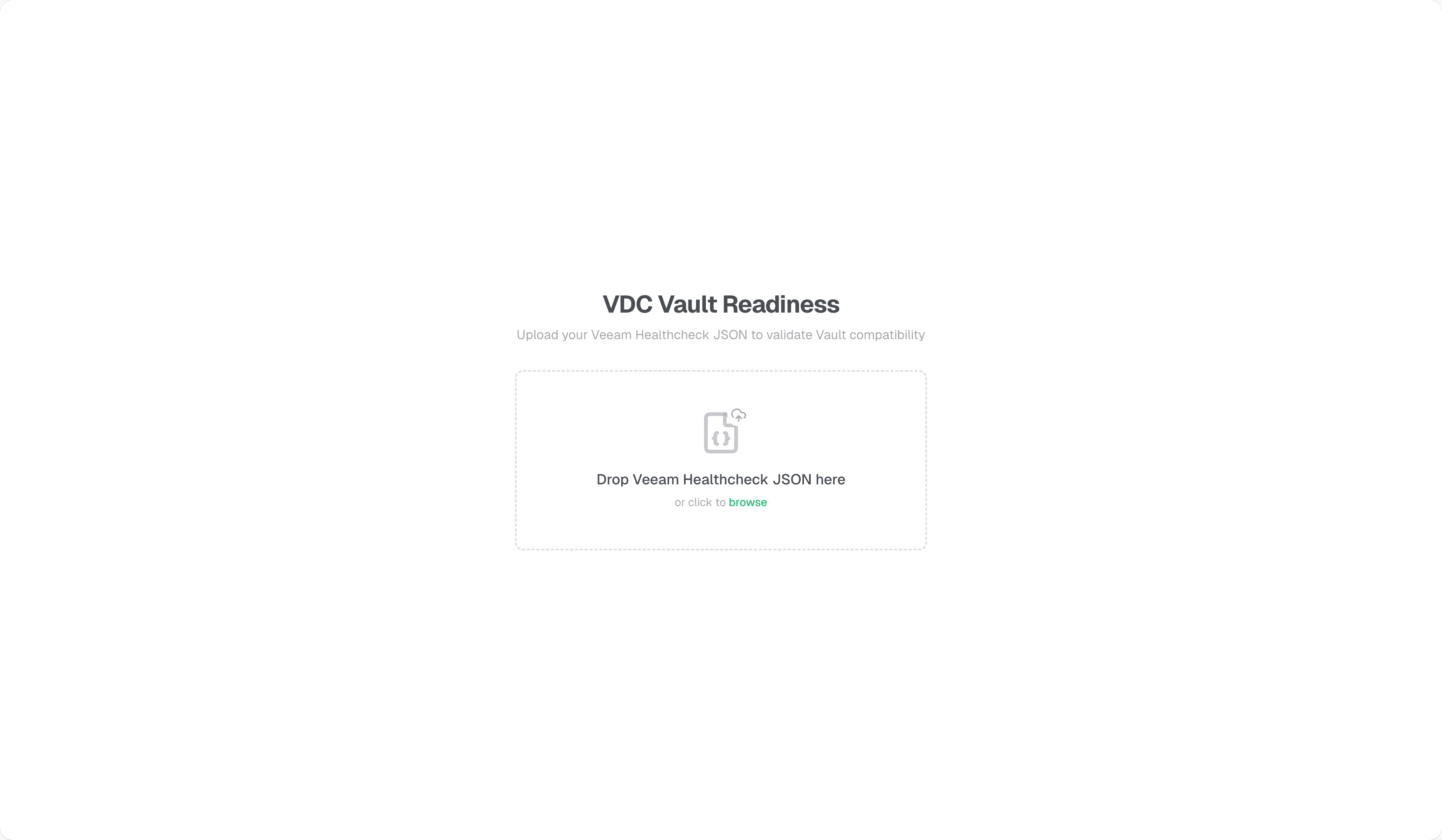
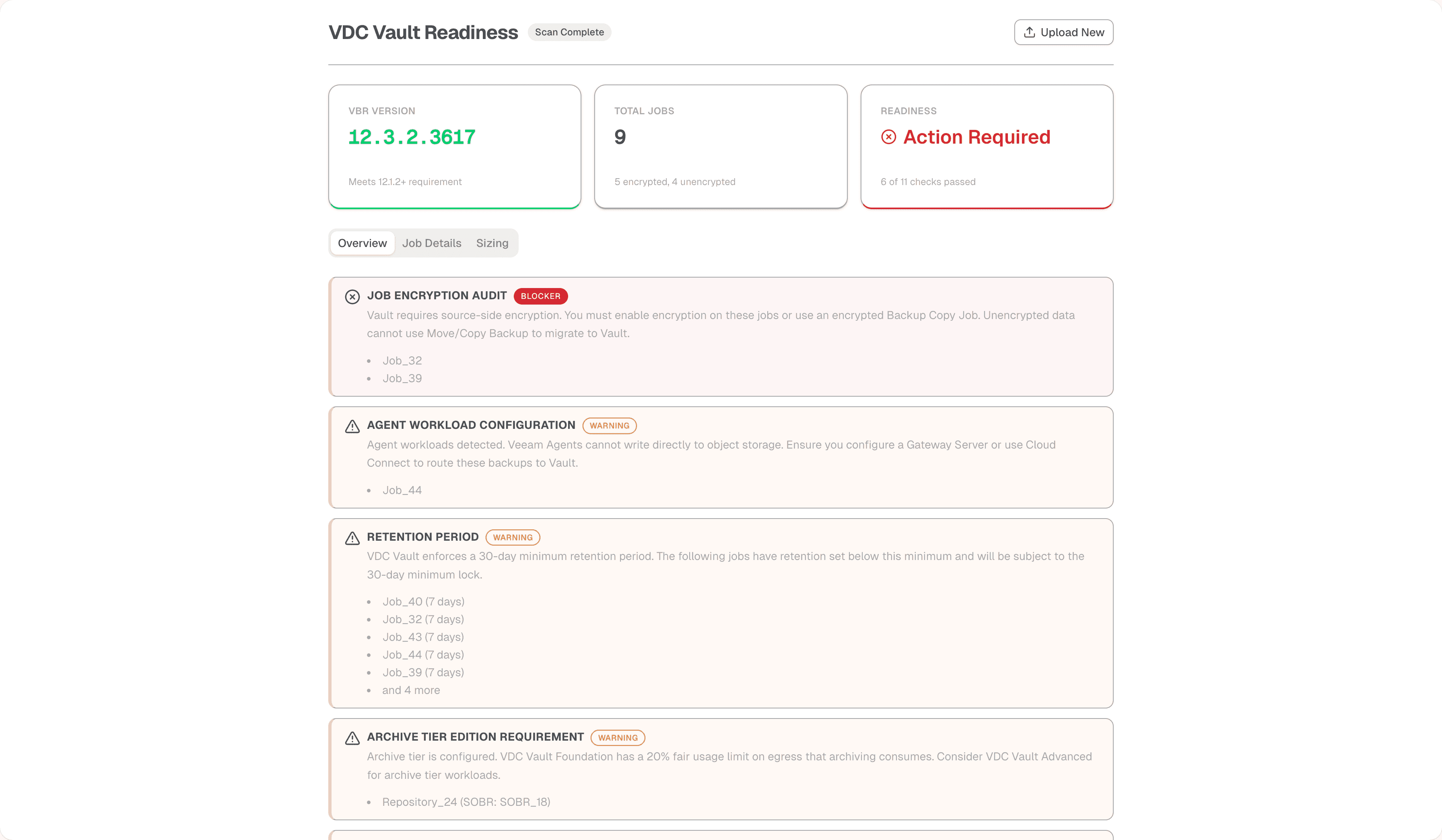
The upload page is straightforward - drag and drop your vHC JSON file. The overview dashboard shows your readiness status at a glance, with blockers and warnings listed prominently.
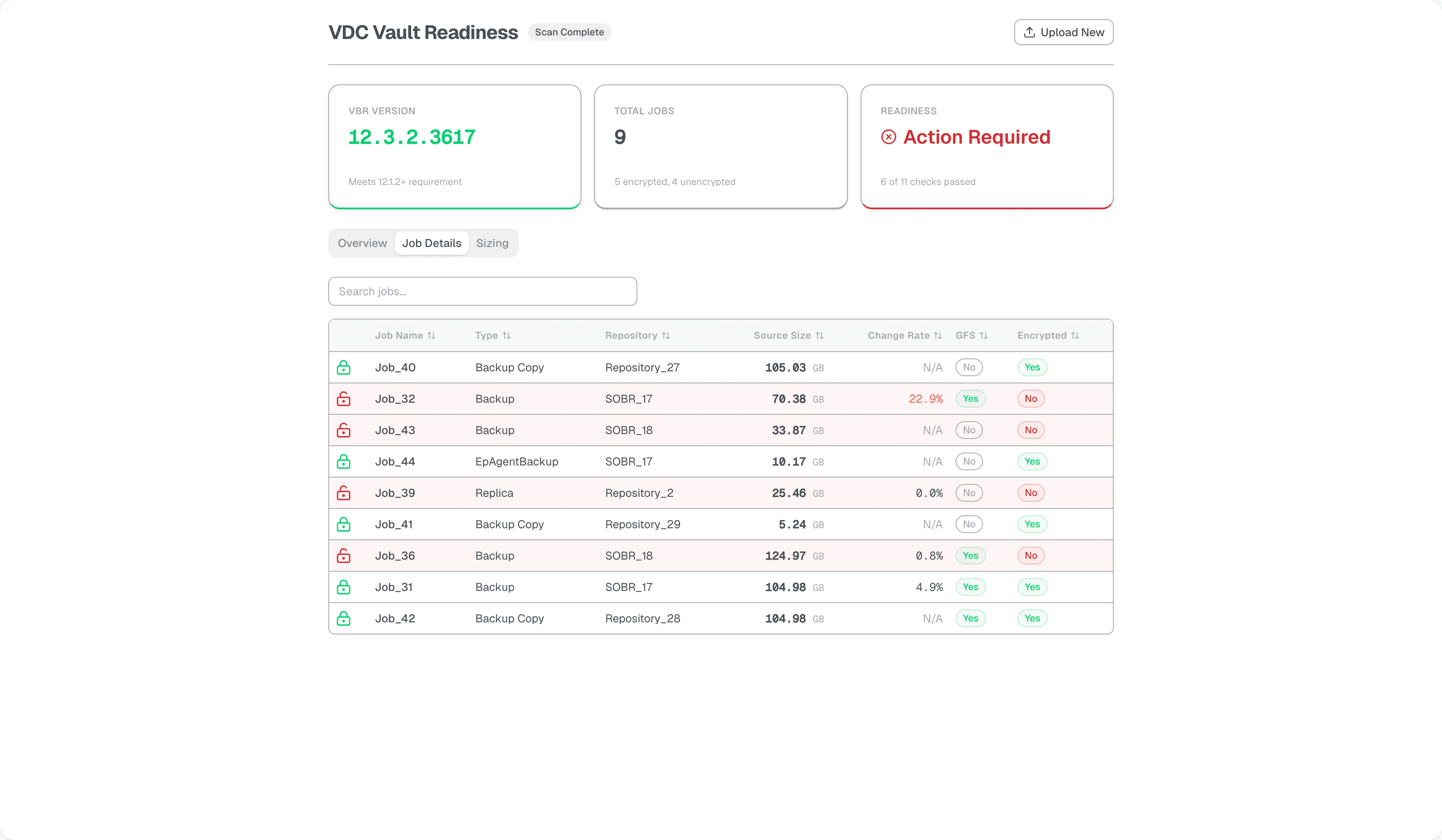
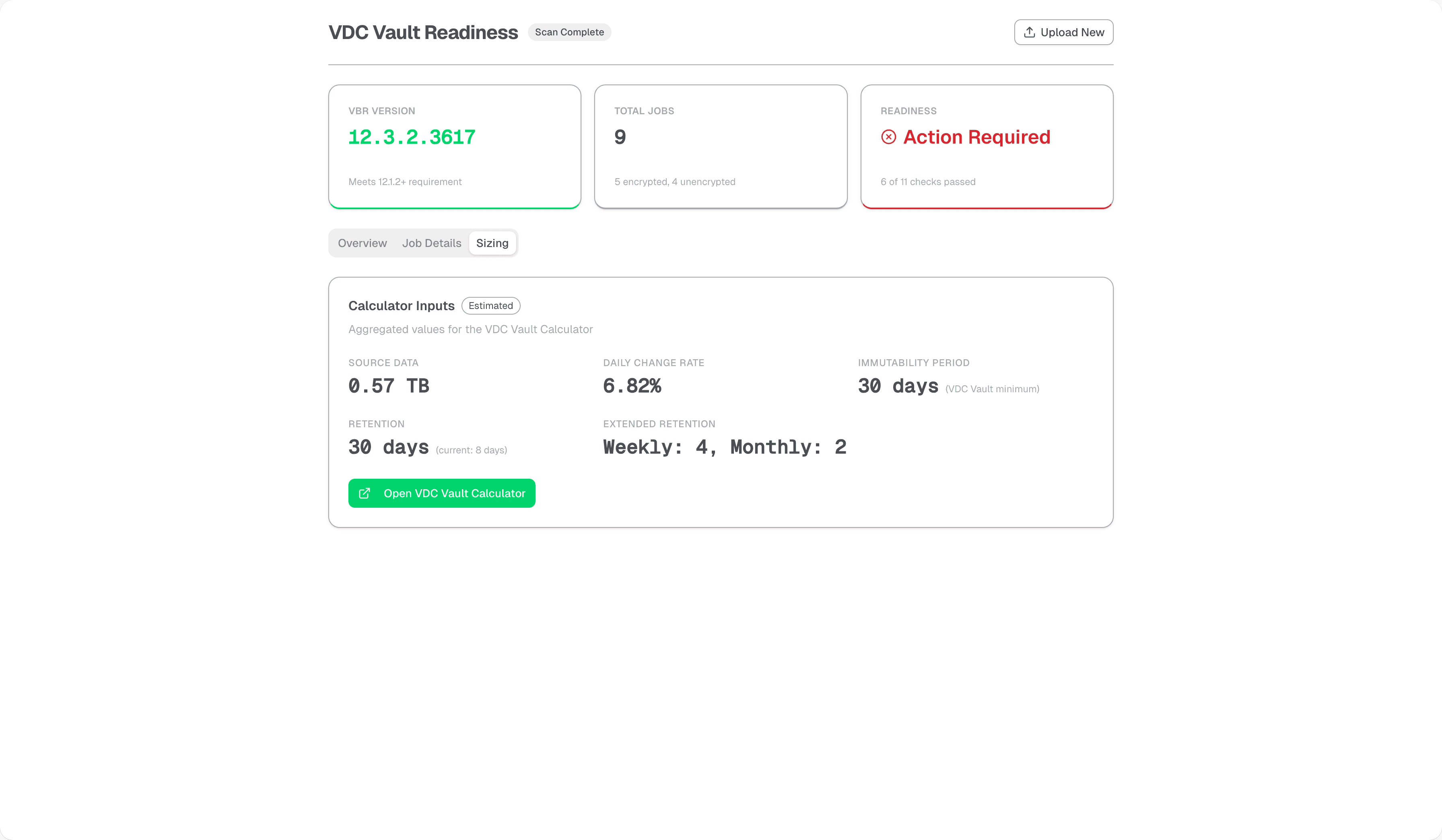
The job details page shows every job with its critical attributes - encryption status, workload type, repository target, current size, and daily change rate. The sizing page aggregates this data to help estimate your Vault capacity requirements.
Try It Out#
This is a work in progress. I’m battle testing each validation rule before adding more, because I’d rather have fewer checks that are accurate than a long list of false positives. Some of the initial rules I threw in just to have something on screen aren’t completely accurate yet, and I’m refining them as I run more Healthcheck files through the tool.
A few checks need data that the Healthcheck collector doesn’t expose today, particularly around SOBR configurations. I’ll be submitting PRs upstream to add those collection points.
I have a roadmap of features I want to add once the basics are solid, but I’m ready to pivot if the community has different priorities. If something is confusing, if a rule is flagging things incorrectly, if the UI doesn’t make sense, or if you think there’s a check I’m missing entirely, I want to know about it. Comment here or open an issue on GitHub.
This is a community project, so if you want to dig into the code and submit changes yourself, go for it. I’m looking forward to seeing what you all do with it.