
As many of you would have seen, Windows Server 2016 has been officially launched, with evaluation media available and General Availability slated for later this month.
One of the great new features in this release, is Storage Spaces Direct, a Software-Defined Storage Solution. There is already plenty of information available on how to get this up and running on Microsoft Docs, but I thought I’d share some of the operational tasks that aren’t so obvious, starting with expanding volumes.
Firstly we want to get the current size of the existing storage tiers that make up our volume
Get-VirtualDisk -FriendlyName vol1 | Get-StorageTier | Format-Table FriendlyName, @{Label=’Freespace(GB)’;Expression={$_.Size/1GB}} -autosize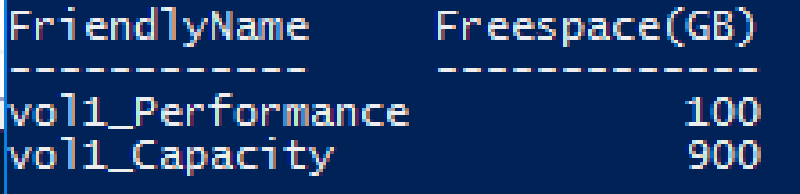
Now in this example, we’re using a Multi-Resiliency Virtual Disk, which allows us to combine the performance of Mirror with the efficiency of Parity to get the best of both worlds. Let’s say this volume has a SQL Server on it, and I know my working data set hasn’t increased but I’ve got lots of cold data and my volume is almost full. I want to just add capacity to the volume to continue to store more cold data.
We want to select just the Parity tier and expand that one
Get-VirtualDisk -FriendlyName vol1 | Get-StorageTier | ?{$_.ResiliencySettingName -eq 'Parity'} | Resize-StorageTier -Size 1000GBAnd then expand the partition to match the new size
Get-VirtualDisk -FriendlyName vol1 | Get-Disk | Get-Partition | ?{$_.type -eq 'Basic'} | Resize-Partition -Size 1100GBNow if we check the storage tiers again we should see our new sizes
Get-VirtualDisk -FriendlyName vol1 | Get-StorageTier | Format-Table FriendlyName, @{Label=’Freespace(GB)’;Expression={$_.Size/1GB}} -autosize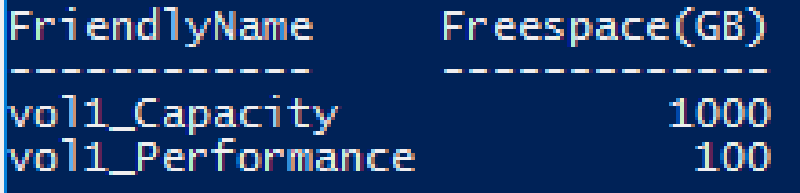
If you wanted to add more Performance Tier to your volume to account for an increase in your active working set, or the data that is write intensive, then you would just have to swap out Parity for Mirror in the command where we expanded the tier.
Shrinking of S2D (Storage Spaces Direct) volumes is not currently supported, however this is a less common scenario.
I’ll be posting more tips like this around Storage in Windows Server 2016 over the next few weeks